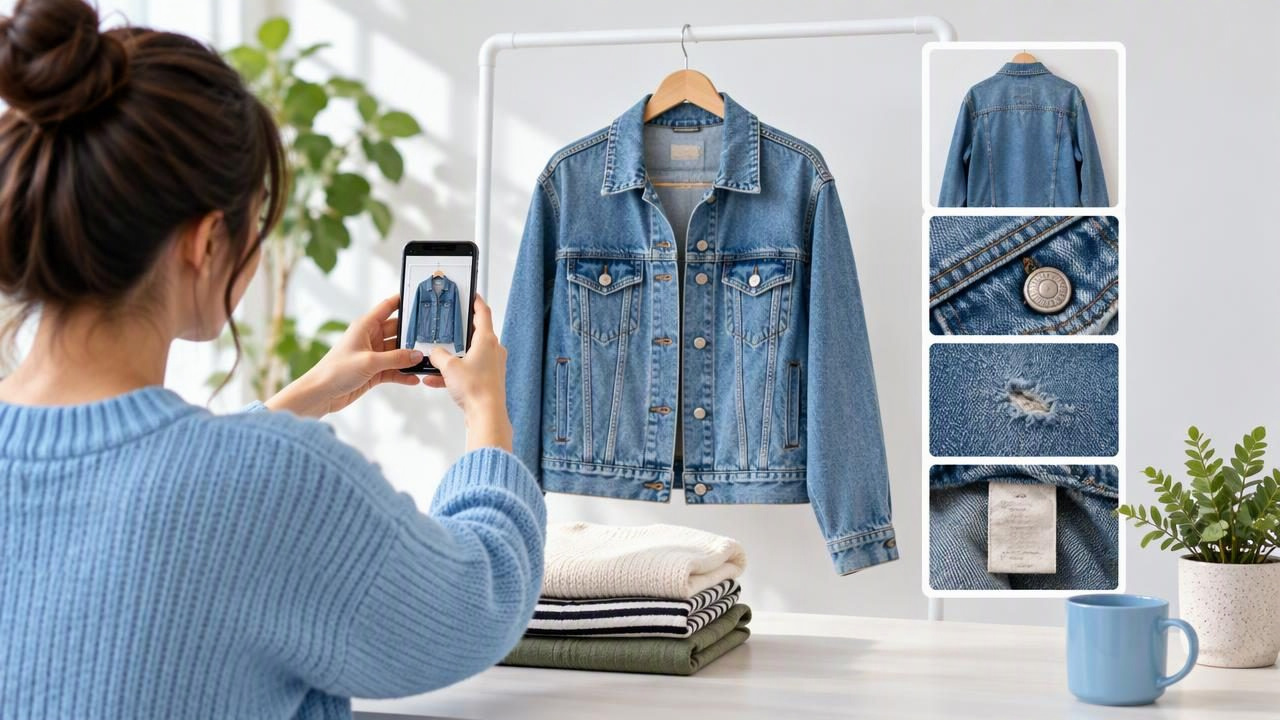
Strong Poshmark listing photos do more than make a clothing item look appealing. They help a shopper understand its shape, color, condition, and details before deciding whether to ask a question or make an offer. A polished image can catch attention, but a complete set of honest photos gives buyers a clearer basis for their decision.
You do not need a complicated studio setup to make useful images. A consistent background, soft light, and a deliberate photo order can improve a listing considerably. The key is to make edits that clarify the garment without changing how it looks in real life. This guide walks through a practical photo sequence, explains which presentation styles suit different items, and covers the limits of common editing choices.
Start with the questions a buyer needs answered
Before taking pictures, think about what someone cannot learn from the listing title or description alone. Does the garment have a distinctive neckline? Is the fabric textured? Is there wear at the cuffs? Does the back have a print, closure, or other feature worth seeing? Your photo set should answer these questions visually rather than relying on one attractive front view.
For example, imagine listing a secondhand linen button-up shirt. A shopper may want to see the overall cut, the collar, the fabric weave, the cuffs, the back, and any signs of use. A front-only image may show the color and general style, but it cannot provide the same understanding of condition or construction. Plan pictures around the information the garment can offer.
Build a useful photo sequence
Put the clearest full-garment view first, then follow with images that add information. A simple sequence for many clothing listings is:
- Front view: Show the complete item, centered and unobstructed.
- Back view: Include it when the back reveals the cut, pattern, or condition.
- Detail views: Photograph labels, closures, fabric texture, pockets, and distinctive design features.
- Condition views: Clearly show flaws, repairs, or areas of wear that matter to a buyer.
- Optional styling or fit context: Add this only when it gives useful information and accurately represents the item.
This order makes the opening image easy to scan while giving interested shoppers more context as they continue. You do not need to use every possible angle for every item. A plain T-shirt may need fewer views than a structured jacket with multiple closures and visible wear. Choose images based on what is important about that particular garment.
Choose a presentation style that suits the item
There is no single best layout for every piece of clothing. The right choice depends on the garment’s shape and what you need the image to communicate.
| Presentation | Works well for | Watch for |
|---|---|---|
| Hanger | Shirts, dresses, and lightweight layers | Uneven shoulders, twisted fabric, or a visible hanger distracting from the item |
| Flat lay | Jeans, T-shirts, scarves, and simple shapes | Unnatural stretching, curled edges, or a silhouette that hides the real cut |
| Folded | Knitwear and items where a compact view suits the presentation | Folding over features, labels, or condition details buyers should see |
| Ghost mannequin | Structured garments where showing the inside neckline or shape adds context | AI-generated shaping that may not reflect the garment’s actual fit |
A hanger photo can make a shirt’s length and drape easier to see, while a flat lay can show the whole outline of jeans at once. A folded sweater may look tidy, but it should not be the only image if folding conceals the neckline, cuffs, or a snag. For any presentation, keep the item’s proportions believable and include a straightforward view that represents the actual piece.
Use lighting and backgrounds to make details legible
Soft, even light helps reveal color and surface detail without creating harsh shadows. A bright window can work well if direct sunlight is not falling across the garment. If one side looks much darker than the other, adjust the item or the light source before relying on editing to correct it.
Choose a simple background that contrasts with the garment. A cream blouse may disappear against a white wall, while a dark jacket may be difficult to distinguish on a black surface. The background should support the item, not compete with it. Check that its color does not cast a strong tint onto the fabric, particularly when photographing pale or neutral clothing.
Keep the camera steady and make sure the full garment is in focus. A slightly closer image can help show stitching or a care label, but the main photo should not crop off sleeves, hems, or other important edges. Take a test picture and inspect it on your screen before photographing the rest of the listing.
Make wrinkle edits carefully
Wrinkles can distract from a garment’s outline, especially in a clean front view. Light retouching may make the image easier to read, but clothing naturally has folds, drape, and texture. Removing every crease can make fabric look synthetic or suggest a smoothness the item does not have when handled.
Consider the linen shirt example. You might smooth a distracting crease running across the center of its front photo while leaving the natural texture and smaller folds intact. Then compare the edited version with the original image. If the fabric weave, seams, buttons, or visible wear have changed, use a lighter edit or keep the original. Wrinkle editing does not repair a stain, hole, snag, or other physical defect; photograph and disclose those separately.
AI tools can make retouching quicker, but their output still needs a human check. Compare the result against the actual garment and the unedited photograph, particularly around patterned fabric, seams, and edges. For more on judging wrinkle edits, see this guide to removing clothing wrinkles in photos.
Keep color, fit, and condition honest
Color can shift because of lighting, camera settings, or editing. Avoid strong filters and heavy color adjustments that make a garment appear warmer, cooler, brighter, or more saturated than it is. If a color is difficult to capture accurately, use neutral light, check the image against the item, and describe any uncertainty plainly in the listing.
Photographs can show how a garment is arranged, but they cannot guarantee how it will fit a particular person. A hanger image, flat lay, or generated model-style image should not be treated as proof of exact fit or measurements. Include measurements in the listing when they are useful, and keep them separate from visual impressions such as “oversized” or “fitted.”
Condition deserves the same care. Take a close-up of a flaw in clear light, and make sure the rest of the set still shows the garment as a whole. Do not use background removal or retouching to erase a worn area or make a damaged edge disappear. Editing should improve visibility, not conceal information a buyer would reasonably want before purchasing.
Common photo mistakes to avoid
- Using only a styled hero image: Add straightforward views that reveal the actual garment.
- Mixing inconsistent lighting: Large changes in brightness or color between photos can make one item seem different from image to image.
- Over-smoothing fabric: Excessive retouching can remove texture and make details look inaccurate.
- Leaving out flaws: Photograph visible wear and describe it rather than relying on a distant full-item view.
- Allowing props to obscure the item: Accessories and styling elements should not cover important features or create confusion about what is for sale.
- Trusting an edit without checking it: Inspect hems, straps, patterns, and edges against the original photograph.
A quick review before publishing
Look through the images in the order a shopper will see them. Ask whether the first picture identifies the item clearly, whether the remaining views add useful information, and whether any important condition detail is missing. Check that the background is tidy, the full outline is visible where appropriate, and the images show consistent color.
Then compare edited pictures with the original garment or source photos. Make sure edits have not altered a seam, softened a fabric feature, changed the apparent shape, or hidden a flaw. If an image looks more polished but less faithful, choose the more accurate version. A clear listing can still be attractive without presenting a secondhand item as flawless.
Make each image earn its place
The most effective Poshmark listing photos work as a small visual explanation: here is the garment, here are the details, and here is its condition. Match the presentation to the item, use a simple setup, and edit only to improve clarity. If you use AI photo editing, treat its output as a draft to inspect—not a substitute for checking what the garment actually looks like. Clothing Studio’s ghost mannequin photo guide offers more context on that presentation style and its limitations.
