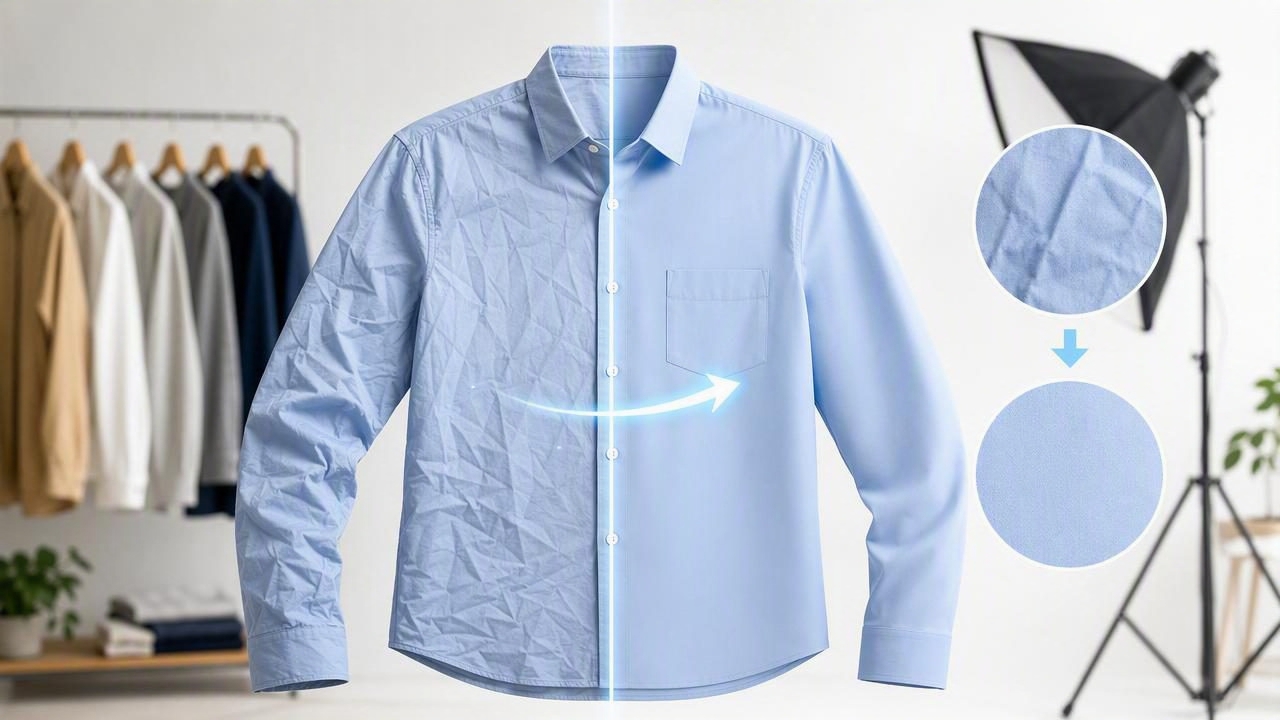
Wrinkles are one of the most common reasons clothing listings look “used,” even when an item is new or in excellent condition. The good news: you don’t always need a steamer, a studio setup, or advanced retouching skills. With the right workflow, an instant wrinkle remover for garment pictures can help you create crisp, natural-looking product photos that feel consistent across your shop.
This guide walks through a simple, repeatable process for fixing wrinkles in photos while keeping fabric texture believable. You’ll also learn when to re-shoot instead of over-edit, plus how to pair wrinkle cleanup with background removal, ghost mannequin, and overall listing polish.
Why wrinkles matter in e-commerce photos (and what “good” looks like)
In online selling, shoppers can’t feel the fabric—so visual cues do extra work. Heavy creasing can suggest poor storage, low quality, or inaccurate sizing. But “perfectly flat” can look fake too, especially on linen, cotton, and denim.
Aim for this balance:
- Reduced harsh creases (the kind that distract from the garment’s shape)
- Preserved natural texture (linen should still look like linen)
- Consistent presentation across your catalog (buyers trust uniformity)
Rule of thumb: Remove wrinkles that change the silhouette or distract from key details (collars, plackets, hems). Keep light texture that communicates fabric type.
Three ways to handle wrinkles: re-shoot, manual retouch, or AI
There isn’t one best method for every item. Use this quick comparison to pick the fastest option that still looks natural.
| Method | Best for | Pros | Watch-outs |
|---|---|---|---|
| Re-shoot (steam/adjust + rephoto) | Severe creases, shiny fabrics, close-up hero shots | Most natural results | Takes time; requires space and setup |
| Manual retouch (brush tools) | 1–2 problem areas, small touch-ups | Precise control | Can look smeared if overdone |
| AI wrinkle reduction | Batch listing photos, moderate wrinkles, daily workflows | Fast, consistent, scalable | May flatten texture if pushed too far |
A fast workflow for wrinkle-free garment photos (without looking over-edited)
Here’s a practical process you can use whether you shoot flat lays, on-hanger, or mannequin/ghost mannequin style.
1) Start with “wrinkle-aware” shooting (saves the most editing time)
Wrinkle removal works best when the original photo is clean, well-lit, and in focus. Before editing, improve your base image with these quick habits:
- Pull the fabric into shape: Smooth with your hands along seams, hems, and the center front.
- Use even light: Soft window light from the side or two lights from both sides reduces harsh crease shadows.
- Keep the camera parallel: Tilting exaggerates folds and warps proportions.
- Mind the surface: A textured blanket under a flat lay can “print” visual noise into fabric. A plain board or sheet is easier to clean up.
If you do only one thing: avoid strong overhead lighting that creates deep wrinkle shadows. Those shadows are what make photos look messy.
2) Fix the background early (it makes wrinkles easier to judge)
Busy backgrounds can hide creases while you’re editing, and then the wrinkles “reappear” once you remove the background. If your workflow includes background removal, do it near the start (or at least preview your item on a clean background).
When you see the garment isolated, it’s much easier to identify which wrinkles are:
- Structural (affecting drape and fit)
- Normal texture (fabric character)
- Distracting creases (should be reduced)
3) Apply an instant wrinkle remover for garment pictures—then dial it back
The biggest mistake with wrinkle tools (AI or manual) is going too far. Over-smoothing can remove knit detail, erase stitch definition, or create a “plastic” finish.
Use this simple approach:
- Start at a moderate setting (aim for “better,” not “perfect”).
- Zoom to 100% to confirm the fabric still looks real.
- Toggle before/after and ask: “Would a buyer believe this garment exists like this?”
- Prioritize key zones: chest/torso, collar, cuffs, waistband, and hems.
If your tool allows selective control, reduce only the most distracting folds and keep subtle ripples where the fabric would naturally bend.
4) Preserve texture on common fabric types
Different materials “want” different results. Here’s how to keep edits believable:
- Linen: Keep light crumpling. Remove only sharp creases crossing the center or branding details.
- Cotton tees: Smooth torso and sleeves, but keep slight natural drape near underarms and side seams.
- Denim: Keep grain and whiskering. Focus on flattening harsh folds from storage.
- Silk/satin: Be conservative—over-smoothing can create strange gradients. Consider a re-shoot if glare is heavy.
- Knitwear: Protect knit pattern. Remove only deep packing creases; avoid heavy smoothing across stitches.
5) Pair wrinkle cleanup with shape-enhancing presentation (ghost mannequin or hanger)
Wrinkle reduction looks more professional when the garment’s shape is clear. If you use ghost mannequin images or on-hanger photos, do a quick check after wrinkle removal:
- Are shoulders even and symmetrical?
- Does the center line (buttons/zip) look straight?
- Do sleeves and pant legs match in length and angle?
Wrinkles often “pull” the eye and make small asymmetries feel larger. Once creases are reduced, minor alignment tweaks become more obvious—fix them for a clean storefront look.
Quality checklist: a 60-second review before you post
Before exporting, run through this quick checklist to avoid common listing-photo issues.
Wrinkle & texture checks
- No smeared fabric: texture still visible at normal zoom.
- No repeated patterns: watch for odd “patches” from aggressive smoothing.
- Seams still defined: collar edges, plackets, and hems look crisp.
Color & lighting checks
- Whites aren’t gray and blacks aren’t crushed.
- No yellow/green cast on neutrals.
- Highlights look natural (especially on satin/leather).
Marketplace readiness checks
- Background is clean and edges aren’t jagged.
- Item fills the frame without cropping key parts.
- Consistent aspect ratio across your listings.
Common mistakes when removing wrinkles in clothing photos
1) Eliminating every crease
Real clothing has movement. Removing every ripple can make a sweatshirt look like a vector graphic. Keep subtle folds where fabric would naturally bend.
2) Smoothing across logos, embroidery, or lace
These areas carry detail buyers look for. If you must reduce wrinkles nearby, work around the detail so it stays sharp.
3) Ignoring shadow direction
If lighting creates strong crease shadows, wrinkle removal may leave inconsistent shading. In that case, reduce the intensity and consider a quick exposure adjustment (or re-shoot with softer light).
4) Editing one photo perfectly and leaving the rest inconsistent
Shops convert better when images feel like a set. A “pretty good” consistent workflow often outperforms one perfect hero image surrounded by mismatched photos.
Batch workflow tips for resellers and small brands
If you list frequently, speed matters. Here are a few habits that make wrinkle removal faster without sacrificing quality:
- Shoot in batches by category (all tees, then all jeans). Similar fabrics respond similarly to edits.
- Standardize your setup: same spot, same light, same distance. Consistency reduces time spent fixing each image.
- Create a naming pattern so edited files stay organized across platforms.
If you want a simple file naming pattern you can copy, here’s one:
brand_itemtype_color_size_view.jpg
Example: everlane_tshirt_black_m_front.jpg
It’s not glamorous, but it prevents rework when you’re uploading to multiple marketplaces.
FAQ: instant wrinkle removal for garment pictures
Does AI wrinkle removal damage fabric detail?
It can if you push it too far. The best results come from moderate smoothing plus a quick zoom check to confirm texture and stitching still look real.
Should I steam first or rely on editing?
Steam (or re-shoot) for severe creases, shiny materials, or close-up hero photos. Use an instant wrinkle remover for garment pictures when wrinkles are moderate and you need speed and consistency.
What’s the fastest way to make photos look “pro” beyond wrinkles?
Combine three basics: clean background removal, consistent framing, and natural wrinkle reduction. Together, they make listings feel trustworthy and store-ready.
Putting it all together: a simple “shop-ready” edit stack
If you want a clean, repeatable order of operations, use this:
- Crop/straighten for consistent framing.
- Background removal (or preview on white/light gray).
- Wrinkle reduction (moderate, texture-preserving).
- Light/color correction to match the real garment.
- Final check at 100% zoom for artifacts, edges, and seam sharpness.
That’s the core of a workflow that scales—whether you’re listing five items a week or fifty.
Note: If you prefer doing this on iPhone with a single streamlined workflow, apps like Clothing Studio combine background cleanup, wrinkle reduction, and presentation tools in one place—handy when you’re editing between sourcing and shipping.
