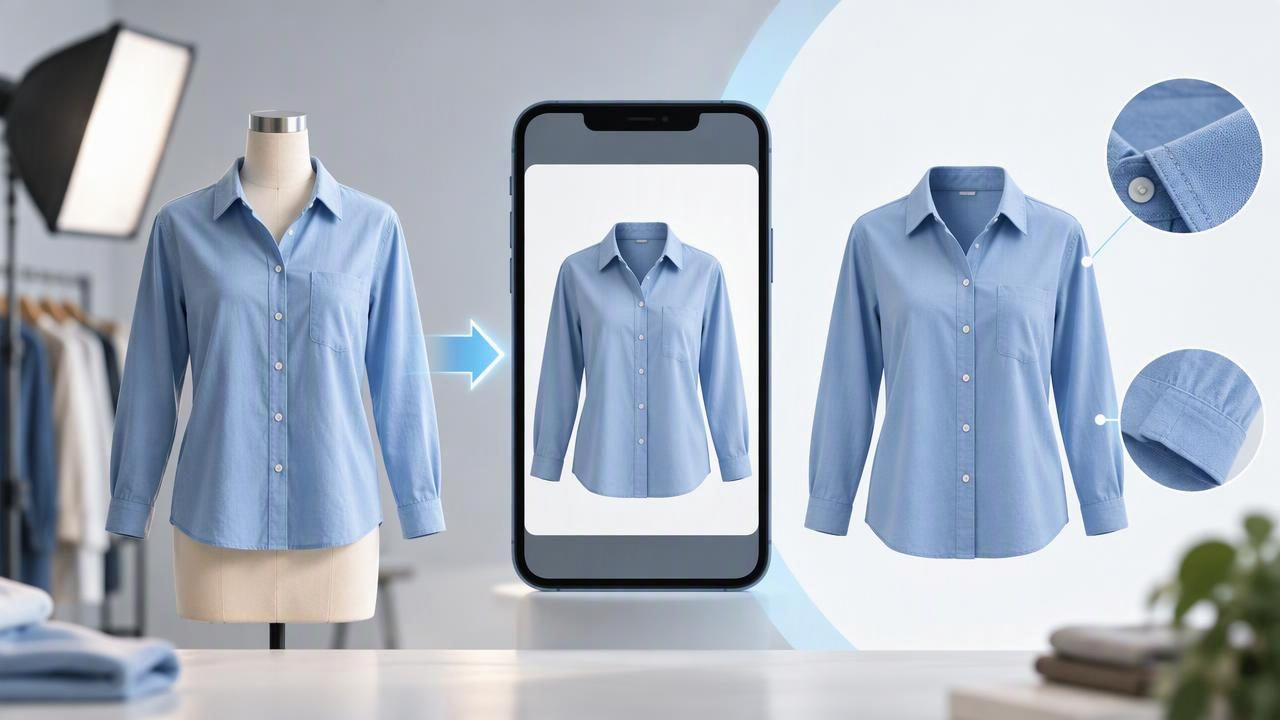
A ghost mannequin image shows a garment as if it were being worn, while leaving the mannequin or model out of the finished picture. For online clothing listings, this can make a shirt, jacket, or dress easier to understand than a hanger shot alone. A ghost mannequin app can help create this presentation from product photos, but the result still needs a careful check against the original garment.
The goal is not to make every item look flawless or to suggest a fit you cannot verify. It is to show the garment’s shape and construction clearly while keeping its color, texture, and condition honestly represented. Here’s how to decide when a ghost mannequin image is useful, what to look for in an app, and how to review the result before adding it to a listing.
What a ghost mannequin app does
A ghost mannequin effect presents clothing with an apparent three-dimensional shape but without a visible person or mannequin. Some workflows use several photographs, such as front, back, and inside-neck views, to show areas that would otherwise be hidden. An app may use AI photo editing to create or combine elements of the presentation. The exact process and available controls vary, so check what the particular app supports rather than assuming every tool works the same way.
This style is especially common for clothing with a defined outline: button-up shirts, blazers, coats, dresses, and structured tops. It can help shoppers see the collar, shoulders, sleeves, and body of an item in one image. It is less useful when the garment’s most important details are its drape, layering, or how it looks on a person. In those cases, a flatlay, hanger photo, or model image may provide better context.
When is the effect useful?
Consider a ghost mannequin presentation when a hanger makes a garment look limp or hides its shape, but a model photo is not practical or appropriate for the listing. A clean front view can give shoppers a quick sense of the silhouette. A separate back or detail image can then show the information the main view cannot communicate.
For example, a reseller listing a lined blazer might use a ghost mannequin-style front image to show the lapels and shoulder shape, followed by a photo of the lining, care label, and any wear. The first image helps explain the form; the supporting pictures document the actual item. The edited presentation should complement those photos, not replace evidence of condition.
Choose another layout if the garment is very sheer, unusually draped, heavily layered, or difficult to represent without guessing how it sits on a body. A flatlay can be clearer for a scarf or a soft knit, while a hanger image may be suitable for a simple T-shirt. The right choice depends on what a buyer needs to assess.
A practical example: photographing a linen blazer
Imagine you are listing a secondhand linen blazer. It has a naturally relaxed shape, a visible weave, and a small mark near one cuff. Start by deciding what each photo needs to communicate. A ghost mannequin-style image could show the front, lapels, pockets, and overall outline. A close-up should document the cuff mark, and another image can show the back and the fabric in natural light.
After creating the edited front image, compare it with the original photograph. Check that the lapel width, button placement, sleeve length, and body shape still look consistent. Look closely at the linen: has the weave become blurry, overly smooth, or unusually uniform? If the app has changed these details, use the original or choose a simpler presentation. Do not rely on the edited image to show the cuff condition; keep the mark visible in a separate, unaltered detail photo and describe it in the listing.
This example illustrates an important distinction: an attractive presentation is not the same as proof of fit. The image can help communicate the blazer’s general shape, but it does not establish exact measurements, how it fits a particular body, or how the fabric moves when worn. Include measurements and clear condition photos for those questions.
How to review an app’s result
Rather than judging an edit only by whether it looks polished, review it for useful product information. Keep the original image available and compare key areas side by side. A quick review can catch changes that are easy to miss when looking only at the finished picture.
- Outline: Does the garment still have the same proportions, sleeve shape, and hemline as the source?
- Construction: Are seams, collars, cuffs, buttons, zippers, and pockets represented plausibly?
- Color and texture: Do the color and material look reasonably close to the original under consistent viewing conditions?
- Openings and hidden areas: If a neckline or interior is shown, does it match a real reference photo rather than an invented detail?
- Condition: Have stains, pulls, fading, or other flaws disappeared from the edited image? Document them separately if they are still present on the item.
If you cannot confirm a detail from the source photos, do not treat a generated version as reliable evidence. Retake the photograph or leave that area out of the main presentation. A simple, accurate image is more useful to a buyer than a more elaborate image that creates uncertainty.
Ghost mannequin, flatlay, hanger, or folded?
There is no single layout that suits every garment. Use the format that makes the item easiest to assess, and add other views when one image cannot tell the whole story.
| Presentation | Often useful for | Check before listing |
|---|---|---|
| Ghost mannequin | Structured shirts, jackets, and dresses | Shape and details should match the real garment |
| Flatlay | Soft items, accessories, and simple garments | Keep the outline and proportions undistorted |
| Hanger | Quick, straightforward views of many tops and outerwear | Show enough of the garment; avoid distracting background clutter |
| Folded | Knitwear, basics, and items where fabric or stacking matters | Include another view if the fold hides important details |
A listing can use more than one presentation. For instance, pair a ghost mannequin-style front view with a flatlay or close-up that shows the fabric and a photo of the care label. Consistent lighting and a similar background across the set help the images feel like one listing, but consistency should not come at the cost of showing the item accurately.
Wrinkle editing: improve clarity, not condition
Wrinkles can distract from a garment’s outline, so light retouching may make a product image easier to read. However, wrinkle removal should not erase the folds that naturally define a material or change how the garment appears. Linen, washed cotton, and textured knits may have characteristic creases that shoppers expect to see.
After retouching, inspect areas around seams, hems, and printed or textured details. If smoothing makes the fabric look painted, softens a pattern, or removes signs of wear, use a less edited image. An edit cannot repair a physical defect; any hole, stain, loose seam, or discoloration still needs to be disclosed. Compare the edited photo with the original before deciding whether it represents the item fairly.
What a ghost mannequin app cannot prove
An edited image cannot guarantee exact fit, fabric movement, or how a garment will look on every body. Nor can it verify details that were absent or obscured in the source photos. AI-generated or reconstructed areas may not preserve every texture and construction detail perfectly. Treat the output as a presentation aid, not as a substitute for careful photography and a complete listing.
For secondhand clothing, show flaws clearly and describe them in plain language. For new products, make sure the image reflects the item actually being sold, including available colors and design details. When using a generated model or mannequin-style presentation, avoid implying that it is a photograph of the exact fit on a real person. Measurements, fabric notes, and supporting images give shoppers information an edited hero image cannot.
Choosing an app for clothing listings
When comparing apps, focus on whether the results suit your inventory and how easy they are to inspect. Useful considerations include:
- Whether the app supports the clothing presentations you need, such as ghost mannequin, hanger, or folded styles.
- Whether you can review the result against the source and keep separate detail photos.
- Whether background removal and wrinkle editing produce images that remain clear at listing size.
- Whether the workflow fits your phone-based listing routine and the image requirements of your selling platform.
- What is available in a demo and which features require a subscription.
Test an app on different materials, not just one easy-to-edit shirt. Try a dark garment, a textured item, and something with a complicated neckline. Inspect the output at normal viewing size and zoom in on important details. A result that looks convincing from a distance may still distort a seam or soften a pattern.
Build trust with the full photo set
Think of the ghost mannequin image as one part of a listing, not the entire listing. Use supporting images to show the back, labels, closures, fabric, and any condition issues. Add accurate measurements and a description that does not claim more than the photos can support. If the item has an unusual fit or drape, explain that rather than expecting an edited silhouette to answer every question.
For a practical starting point, Clothing Studio offers an iOS photo editor for clothing listings; its ghost mannequin photo guide explains the presentation, and full app features require a subscription. Whatever tool you choose, compare edited images with the real garment and keep the listing transparent. That balance makes product photos more useful to shoppers and helps set fair expectations.
