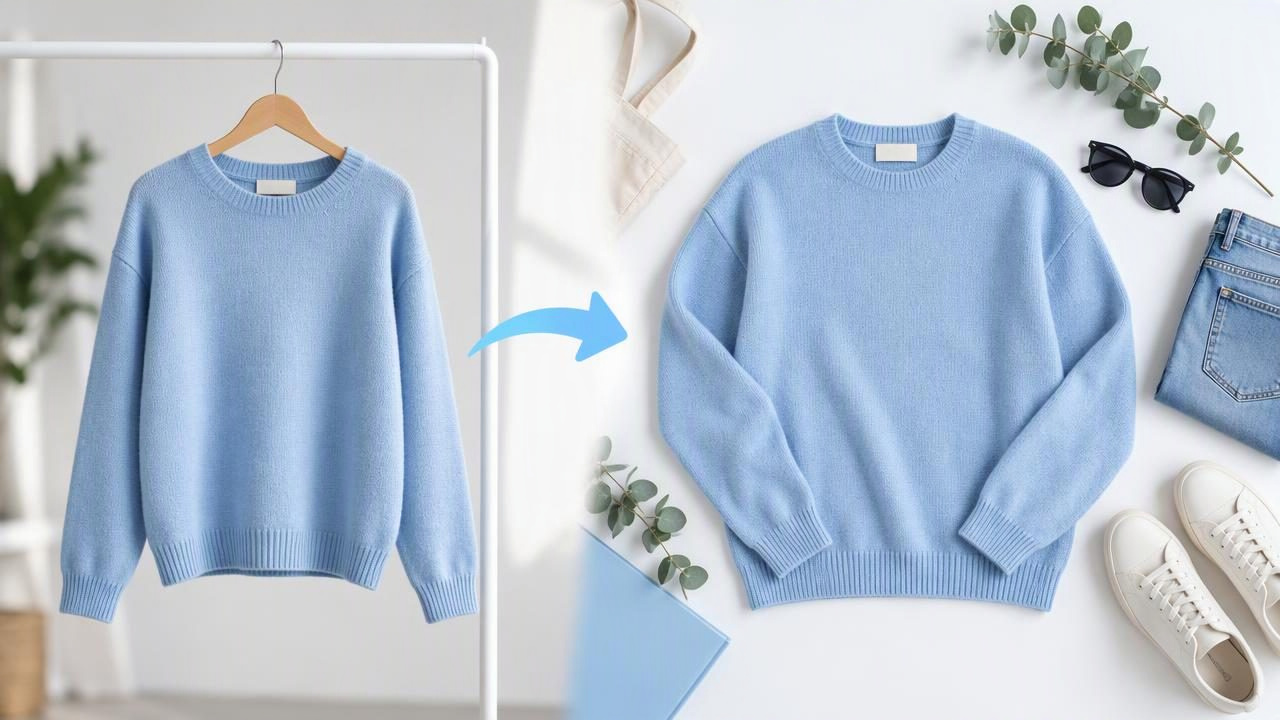
To turn hanger photos into flat lay images, you need to change more than the background: the garment’s viewpoint, outline, and visible details must also look like a piece of clothing arranged on a flat surface. Editing can help create a consistent presentation, but an AI-generated flat lay may infer details that a hanger photo does not show. For accurate listings, compare the result with the original garment and photograph the item flat when exact shape and construction matter.
This guide explains when conversion makes sense, how to approach it, and what to check before using the image in a resale or e-commerce listing.
What changes when a hanger photo becomes a flat lay?
A hanger image usually shows a garment hanging vertically, with gravity pulling the fabric downward. The hanger may support the shoulders, pull the neckline into a particular shape, or hide part of the collar. Sleeves can hang at different angles, and the garment may twist slightly. A flat lay, by contrast, shows clothing arranged horizontally, usually with the body and sleeves spread out so their overall shape is easy to see.
That means a conversion can involve changing the garment’s orientation and silhouette, not merely removing the hanger. The editor may need to create or reposition areas that were covered, folded behind the garment, or outside the frame. Those newly visible areas are interpretations rather than direct records of the item.
A clean background and even lighting can improve either kind of image. But they cannot, by themselves, turn the visual information in a hanger photo into a fully verified view of every part of the clothing.
When is a converted flat lay useful?
A converted image can be useful as a secondary presentation when you want a listing to have a more uniform look, or when you need a quick visual showing the garment arranged flat. It may also help a shop maintain a consistent style across a group of product images. For instance, a reseller could use a clear front-on hanger shot as the primary photo and include an edited flat-lay-style image later in the gallery.
It is less suitable as the only image when the garment’s exact proportions, construction, or condition are central to a buyer’s decision. A real flat-lay photograph is generally the safer choice for showing details such as a cropped hem, unusual sleeve shape, asymmetric design, or a flaw that might be obscured in the hanging view.
How to turn hanger photos into flat lay images
- Choose a useful source photo. Start with a well-lit, straight-on image in which the whole garment is visible. Avoid a source where the hanger covers important details, the sleeves overlap the body, or the item is partly out of frame. A conversion cannot reliably restore information the original photo never captured.
- Decide what the image needs to show. Consider the garment’s front, outline, sleeves, neckline, and hem. If the goal is simply a different presentation, an edited image may be enough. If buyers need to assess exact dimensions or condition, take a real flat-lay photo instead of relying on an altered viewpoint.
- Change the presentation, not the garment’s identity. Use an image-editing workflow that creates a flat, arranged appearance while keeping the color, pattern, and design consistent with the source. Avoid prompts or edits that add styling details, reshape the item, or make it appear more fitted than it is. Treat any newly generated areas as uncertain until you can compare them with the actual item.
- Keep the background simple. A plain, neutral surface helps the garment stand out. Background removal can be useful when the original setting is distracting, but inspect the edges around straps, lace, fringe, and sleeves. Removing a background should not erase garment details or leave parts of the item looking cut off.
- Retouch only visible presentation issues. You can consider correcting distracting lighting or minor photo wrinkles, but do not edit out a real stain, hole, fading, or other condition issue. Wrinkle editing can also change the appearance of fabric texture, so use a light touch and compare the result against the original.
- Review the final image beside the source. Check the outline, neckline, seams, buttons, pockets, print placement, and hem. Ask whether a buyer could mistake an inferred or altered detail for something confirmed about the real item. If you cannot verify a detail, use a genuine photograph that shows it or leave the converted image out.
Example: converting a blazer photo
Imagine a navy blazer photographed on a hanger against a bedroom wall. The front is visible, but the hanger covers part of the collar, one sleeve crosses the body, and the hem is slightly turned away. An edited flat-lay-style image might place the blazer on a plain background with its sleeves arranged outward. That can make the presentation feel more orderly, but the editor has to infer what the covered collar and hidden sleeve area look like.
Before using that result, compare it with the blazer itself and any other photos you have. Confirm that the lapels, buttons, pockets, sleeve length, and hem are represented accurately. If the conversion makes the blazer look shorter, wider, or more structured than it is, do not use it to imply an exact fit or shape. A real flat lay or additional close-up can give buyers a more dependable view.
What AI editing cannot confirm
AI photo editing can create a more polished presentation, but it does not inspect the physical garment. It cannot confirm the exact dimensions, fabric composition, fit, or condition from a single image. It may interpret a hidden section in a plausible-looking way without reproducing the item precisely. It may also soften or alter texture while reducing visible wrinkles.
For that reason, do not treat a generated flat lay as proof of details missing from the source. It is not a substitute for checking the garment, taking measurements, or photographing important features. It also does not repair hidden defects; an edit can only change what appears in the image. If a converted view differs from the real item, use the original photograph or retake the image rather than trying to make the discrepancy disappear.
Flat lay conversion versus taking a new photo
| Approach | Useful for | Watch out for |
|---|---|---|
| Convert a hanger image | Creating a more uniform presentation when the source is clear and the image is supplementary. | Unseen areas, inferred shape, and possible changes to texture or proportions. |
| Photograph the garment flat | Showing the item’s actual outline, arrangement, and visible condition. | Uneven lighting, stray folds, and sleeves or hems that are hard to arrange neatly. |
| Keep the hanger image | Showing how the garment hangs and preserving the original viewpoint. | The hanger or background may distract, and some details may remain obscured. |
These approaches can work together. A seller might use a genuine hanger photo to show how a coat hangs, a real flat lay to show its overall shape, and close-ups to document a label or flaw. The aim is not to make every image identical; it is to give shoppers useful, consistent views without presenting an edited interpretation as a verified photograph.
A final review checklist
- Is the whole garment visible in the source image?
- Does the edited outline match the real item?
- Are colors, pattern placement, seams, and visible details still credible?
- Could any generated area be mistaken for a confirmed feature?
- Have real flaws and condition details been kept visible in the listing photos?
- Would a new flat-lay photo be more accurate for this particular garment?
If wrinkle cleanup is also part of your photo workflow, Clothing Studio’s guide to removing clothing wrinkles explains how to approach retouching without losing sight of the original garment. The app offers clothing-photo editing tools, with full features available by subscription.
In short, turning hanger photos into flat lay images can help create a different, more orderly presentation, but it cannot reveal details the source does not contain. Use the edit as a visual aid, compare it carefully with the real item, and choose an actual flat-lay photograph whenever accurate shape or condition is essential.
