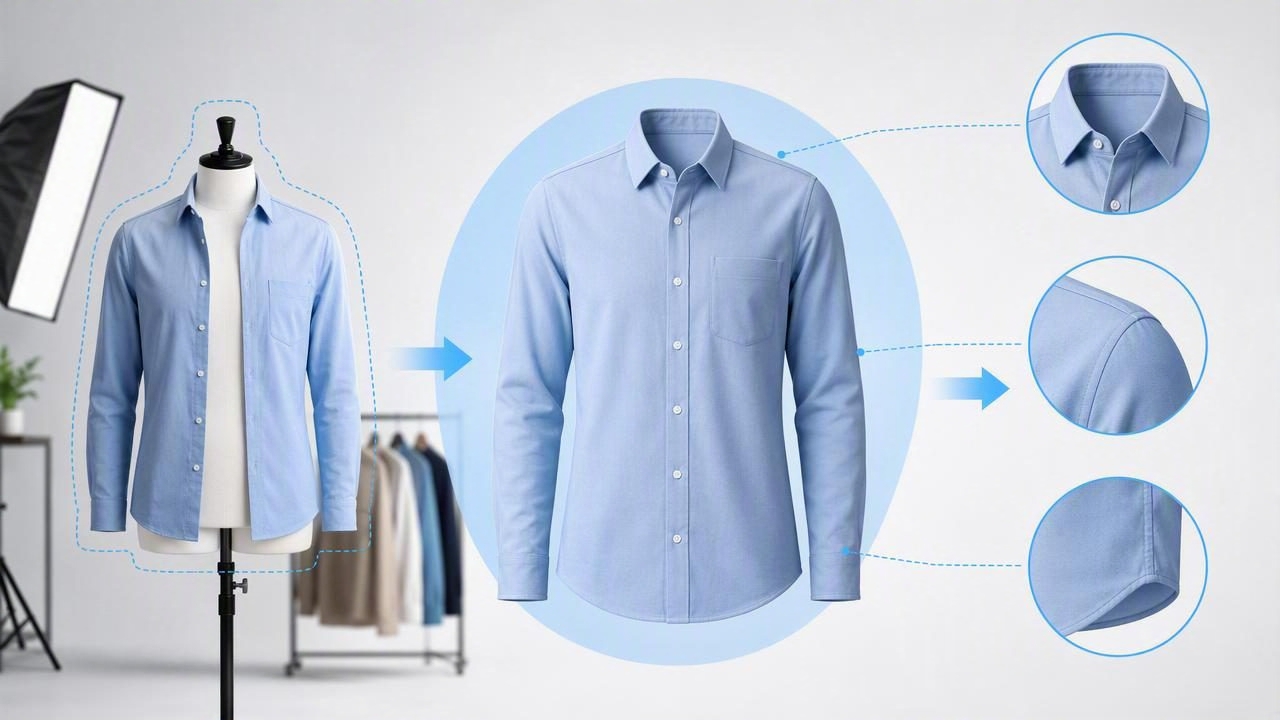
If you sell clothing online, you already know the photo can make or break the click. Shoppers want to see the shape, fit, and details clearly—without distractions. That’s why the ghost mannequin look (also called “invisible mannequin”) is so popular: it shows garments as if they’re being worn, but without a visible model or form.
This guide explains what the ghost mannequin effect is, when it works best, and how to build a simple, repeatable workflow using a ghost mannequin app—even if you’re shooting with just an iPhone and a basic setup.
What is the ghost mannequin effect?
The ghost mannequin effect is a style of apparel photography where the clothing looks three-dimensional and “filled out,” but the mannequin (or model) is removed. The result is clean and professional—especially for tops, jackets, dresses, and structured items.
In traditional studios, this effect is created by photographing the garment on a mannequin, then taking additional shots (often of the inside neck label area) and compositing images in editing software. A good ghost mannequin app aims to simplify this process so resellers and small brands can get similar results without complex tools.
Why sellers use a ghost mannequin app
- Shows shape and structure: Better than flat lays for items like blazers, coats, collared shirts, and dresses.
- Looks premium: Clean presentation can increase trust—especially when buyers compare multiple listings.
- More consistent storefront: Your grid looks cohesive, which helps repeat buyers recognize your shop.
- Faster editing: AI-assisted workflows can reduce the time spent on background cleanup and compositing.
When shoppers can quickly understand fit and silhouette, they’re more likely to keep browsing—and less likely to bounce to another listing.
Ghost mannequin vs. other clothing photo styles
Not every item (or brand vibe) needs ghost mannequin images. Here’s a practical comparison to help you choose the right style per category.
| Style | Best for | Pros | Trade-offs |
|---|---|---|---|
| Flat lay | T-shirts, casual wear, accessories | Fast, simple, minimal setup | Can look “flat,” less sense of fit |
| On-hanger | Everyday tops, lightweight pieces | Quick, good for volume listing | Hanger visibility, shoulder shape can distort |
| Model photo | Trend items, fit-dependent pieces | Highest lifestyle appeal | More time/cost, fit varies by model |
| Ghost mannequin | Structured garments, premium presentation | 3D look without model, clean and scalable | Needs careful shooting + clean edges |
What you need before you start (simple setup)
You don’t need a studio. You do need consistency.
Minimal gear checklist
- Phone camera with portrait or standard mode (avoid extreme wide-angle)
- Bright, even light (window light or a basic light kit)
- Backdrop (plain wall, white sheet, or foam boards)
- Mannequin or dress form (optional, but helps shape structured items)
- Clips/pins to tuck excess fabric behind
Quick lighting rule
Aim for soft, even light with minimal shadows. Harsh shadows make background removal and edge cleanup harder, and they can create uneven color across the garment.
A step-by-step ghost mannequin app workflow
The exact buttons vary by app, but the workflow stays the same. The key is to shoot with editing in mind.
1) Prep the garment like a buyer would want to see it
- Lint roll first (small fibers become “noise” after editing).
- Steam or smooth obvious wrinkles (even if your app can reduce them later).
- Button, zip, and align seams so the silhouette is true.
2) Photograph the “front” shot on form
Center the item, keep the camera level, and leave a little space around the garment. Consistent framing helps your listings look uniform across platforms.
3) Take an interior/label shot (the secret to a clean neckline)
For tops, jackets, and dresses, flip the garment slightly to capture the inside neck/label area (or shoot a second image that clearly shows the inner collar). This is what creates that realistic “hollow” look when composited.
4) Remove the background
Use background removal to isolate the garment. If your marketplace prefers white or light neutral backgrounds, set that now. If you use a consistent backdrop, editing becomes faster over time.
5) Create the ghost mannequin cutout
In your ghost mannequin app, combine the main shot with the interior shot so the neckline (or sleeves/waist area) looks natural. The goal is a believable inner depth—not a sharp, fake cut.
6) Refine edges and fix small distractions
- Edges: Watch for jagged hems, missing sleeve corners, or fuzzy collars.
- Color accuracy: Adjust exposure slightly, but avoid heavy filters.
- Logo/patch clarity: Ensure brand details remain crisp after smoothing.
7) Export consistently for every platform
Consistency beats perfection. Choose one export size and background style you can repeat. If a platform compresses images, start with high quality to reduce artifacts.
Common mistakes that make ghost mannequin photos look “off”
- Neckline mismatch: The interior shot doesn’t align with the outer collar, creating a “floating” look.
- Over-smoothing fabric: Removing texture makes clothing look plastic and can hide true condition.
- Distorted proportions: Shooting too close with wide-angle can warp sleeves and shoulders.
- Uneven white backgrounds: Gray corners or heavy shadows reduce the premium feel.
- Inconsistent cropping: Listings look messy when each item is framed differently.
Best practices by clothing type
Tops and jackets
- Prioritize the collar and shoulder line—these sell fit.
- Pin excess fabric behind so the body looks structured, not baggy.
Dresses
- Keep the waist seam level and centered.
- Show sleeves clearly—avoid blending them into the background.
Pants and skirts
- Ghost mannequin is less essential; flat lay or hanger can be faster.
- If you do ghost mannequin, focus on waistband depth and clean fly/closure alignment.
A repeatable “batch listing” system (so you don’t burn out)
If you list in volume, efficiency matters more than micro-edits. Try batching your work into phases:
- Batch 1: Prep 10–20 items (lint roll, steam, tag checks).
- Batch 2: Photograph all items (front + interior shot for each).
- Batch 3: Edit in one sitting (background removal + ghost mannequin effect).
- Batch 4: Export, upload, and write listings.
Optional: a simple file naming template
Good naming prevents mix-ups when you’re editing multiple similar items.
brand_itemtype_color_size_style_front.jpg
brand_itemtype_color_size_style_inner.jpg
brand_itemtype_color_size_style_final.jpg
How to tell if your ghost mannequin images are working
You don’t need perfect studio results. You need photos that reduce buyer uncertainty. Use these quick checks:
- Silhouette check: Can you see the overall shape in one second?
- Edge check: Zoom in—do hems and collars look clean?
- Detail check: Are fabric texture and key features (buttons, pleats, pockets) visible?
- Consistency check: Do your last 9 listings look like they belong together?
FAQ: ghost mannequin app questions sellers ask
Do I need a mannequin to use a ghost mannequin app?
Not always. Some sellers use hanger shots or careful flat lays, but a form makes structured items look more natural and reduces editing time.
Will ghost mannequin photos reduce returns?
They can help when they show shape and construction clearly, but returns usually depend on accurate measurements, honest condition notes, and color accuracy too.
What background works best?
For most marketplaces, a clean white or light neutral background performs well because it keeps focus on the garment. The key is consistency across your shop.
How many photos should I include per listing?
A strong set is: one ghost mannequin “hero” image, close-ups of fabric/labels/flaws, and one shot showing any special details (lining, embroidery, hardware).
Closing thoughts
A ghost mannequin app is most valuable when it helps you create a repeatable standard: clean edges, consistent framing, and true-to-life shape. Start simple—focus on good lighting and two key shots (front + interior)—then refine your process as you learn what your buyers respond to.
If you’re exploring tools to streamline this workflow on iOS, Clothing Studio is one option sellers use for quick clothing presentation edits like background cleanup and ghost mannequin-style imagery.
