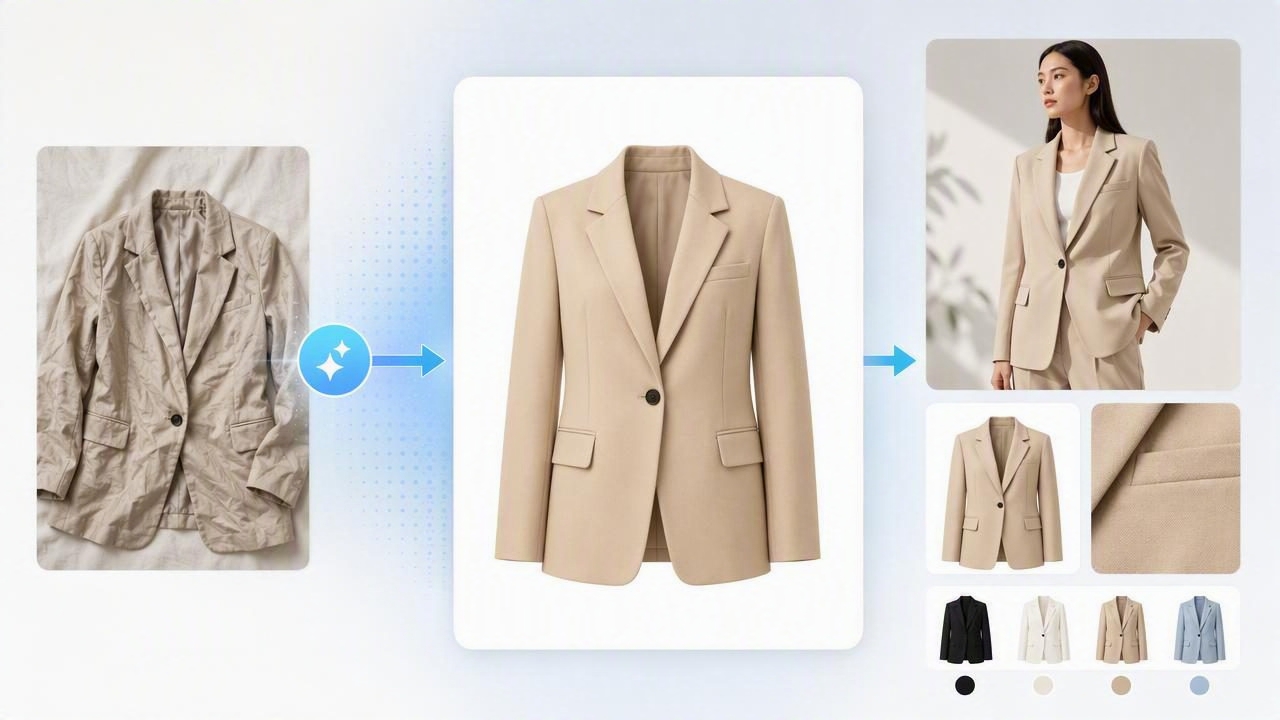
In online fashion, buyers can’t touch fabric, check seams, or see true drape in person—so your photos do the selling. The good news: you don’t need a studio, perfect lighting, or a full editing background to publish clean, consistent images. A fashion image enhancer workflow (especially one that uses AI photo editing) can help you standardize your look across listings, reduce distractions, and make items feel more “buyable” at first glance.
This guide walks you through a practical, repeatable approach for fashion resellers and small brands—covering wrinkle cleanup, background removal, ghost mannequin, and model-style outputs—without getting overly technical.
Why consistency matters more than “perfect” photos
Buyers scroll fast. If your catalog looks cohesive, it signals reliability: items are accurately represented, cared for, and shipped by someone who pays attention. Consistency also helps algorithms and shoppers alike because your thumbnails become recognizable.
- Higher click-through: cleaner thumbnails stand out on crowded marketplaces.
- Fewer questions: clear, standardized angles reduce “Can you show the back/hem/label?” messages.
- Fewer returns: accurate color and detail shots reduce surprises.
- Faster listing: a repeatable checklist prevents decision fatigue.
Tip: Aim for “trustworthy and consistent,” not “editorial and perfect.” Your goal is clarity: fabric, fit, color, and condition.
What a fashion image enhancer workflow should fix (in order)
When you edit randomly, you risk over-editing or missing the issues that actually hurt conversions. Instead, follow a priority order that matches how shoppers perceive a photo:
- Composition: centered item, straight horizon, minimal clutter.
- Exposure & color: readable details and accurate tone.
- Wrinkles & shape: remove harsh creases; improve presentation.
- Background: remove distractions and standardize.
- Consistency outputs: ghost mannequin/model-style images when helpful.
- Export settings: right size and format for your platform.
Choose the best presentation style for the item
Not every garment benefits from the same layout. Use the style that shows fit and structure with minimal effort.
| Presentation style | Best for | Main benefit | Watch out for |
|---|---|---|---|
| On-hanger | Tees, blouses, light jackets | Fast to shoot; easy for volume | Shoulders can look pointy; hems can curl |
| Flat lay | Denim, knits, accessories | Shows full shape; easy to repeat | Wrinkles show strongly; needs neat styling |
| Folded | Sweaters, tees, stacks, bundles | Great for close-ups and texture | Can hide length/fit details |
| Ghost mannequin | Structured tops, dresses, outerwear | Shows form and interior label/neckline cleanly | Needs clean edges around openings |
| Model-style image | Hero image for key items | Improves context and perceived value | Must still represent the item accurately |
Step-by-step: a repeatable editing checklist
Use this checklist for every item. It keeps your catalog cohesive and helps you finish listings faster.
1) Capture with editing in mind (quick setup)
- Use the same spot: a blank wall or a consistent backdrop area.
- Soft light wins: face a window; avoid harsh overhead shadows.
- Keep the camera level: straight-on angles reduce distortion.
- Leave margin around the garment: helps background removal and cropping.
2) Clean up exposure and color first
A fashion image enhancer is most valuable when it preserves realism. Before anything else, ensure:
- Whites look white (not yellow/blue), and blacks keep texture (not crushed).
- Skin-tone-like fabrics (beige, blush, cream) don’t drift too warm.
- Patterns are readable without sharpening into noise.
Practical check: compare the edited photo to the item in natural light for 10 seconds. If it feels “off,” dial it back.
3) Reduce wrinkles without changing the garment
Wrinkles can imply “worn out” even when the piece is new. Light unwrinkling helps, but avoid smoothing so much that the fabric loses character.
- Do smooth: harsh fold lines, shipping creases, distracting rumples near the center.
- Don’t smooth: intentional drape, pleats, ribbing, denim whiskering, linen texture.
4) Background removal and clean edges
Background removal is one of the highest-impact steps for marketplace photos. A clean background:
- makes the garment the clear focus,
- improves thumbnail readability,
- creates a consistent storefront look.
Edge-quality matters. Zoom in on tricky areas: lace, fringe, straps, and fuzzy knits. If you see jagged edges or missing fabric, refine the cutout until it looks natural.
5) Add structure with ghost mannequin (when it helps)
The ghost mannequin look is popular because it shows shape without a person in the shot. It’s especially useful for collars, shoulders, and dresses where the “hang” matters.
Best practice: use ghost mannequin images as your primary gallery photo for structured items, and include at least one natural shot (hanger/flat lay) plus close-ups for transparency.
6) Use model-style images selectively
Model-style outputs can boost perceived value and help buyers imagine fit. Use them when you need a hero image for a best-seller or a high-margin piece. Keep it honest:
- Don’t change length, neckline, or silhouette.
- Don’t “invent” details that aren’t present.
- Do include detail photos of the actual item (labels, flaws, fabric).
Standardize your catalog with a simple “photo style guide”
If you list often, document your choices once so you don’t decide from scratch every time. Here’s a lightweight style guide you can copy:
- Background: pure white or light neutral.
- Crop: consistent margins; item centered; same zoom level per category.
- Angles: front, back, label, fabric close-up, flaw close-up (if any).
- Color rule: match the real item; avoid heavy filters.
- Consistency: same cover style for each category (e.g., dresses = ghost mannequin; tees = flat lay).
Example listing photo set (fast but complete)
- Cover image (clean background, centered)
- Back view
- Close-up: fabric texture/pattern
- Close-up: brand + size tag
- Close-up: condition note (if needed)
File naming and exporting (so you can find everything later)
Organization saves real time when you cross-post or relist. Keep it simple with a consistent naming template.
category_brand_item_color_size_condition_angle.jpg

# Example:
dress_zara_wrap_black_m_good_front.jpg
dress_zara_wrap_black_m_good_back.jpg
dress_zara_wrap_black_m_good_label.jpg
Export tip: Save high-quality JPEGs for most marketplaces. If a platform supports larger images, export a bigger version once and reuse it everywhere (then let the platform compress as needed).
Common mistakes that make photos look “cheap” (and how to fix them)
- Inconsistent backgrounds: fix with background removal and one standard color.
- Over-smoothing fabric: reduce wrinkle edits until texture returns.
- Orange or gray whites: correct white balance so neutrals look neutral.
- Odd proportions: don’t stretch to “fill the frame”; crop instead.
- Too few detail shots: add labels, hems, and condition close-ups.
How to evaluate your results (a quick quality check)
Before publishing, do a 30-second review:
- Thumbnail test: zoom out—can you instantly tell what it is?
- Edge test: zoom in at sleeves/straps—does the cutout look natural?
- Truth test: does color match real life in daylight?
- Consistency test: does it match your last 10 listings?
FAQ: fashion image enhancer editing for resellers
Should I use pure white backgrounds?
Pure white is a safe default for most marketplaces because it looks clean and consistent. A light neutral can also work if it matches your brand style—just keep it consistent.
Will AI editing get my listing flagged?
Most platforms care about accuracy. Keep edits focused on clarity (lighting, background cleanup, wrinkle reduction) and avoid altering the actual product details.
Is ghost mannequin better than flat lay?
It depends on the garment. Ghost mannequin helps structured items show shape; flat lays can be faster and work great for knits, denim, and casual pieces. Use the table above as your decision guide.
Putting it all together
A strong fashion image enhancer routine is less about flashy editing and more about repeatable clarity: consistent background, true-to-life color, reduced distractions, and a presentation style that fits the garment. Once you standardize your steps, you’ll list faster, your storefront will look more professional, and buyers will feel more confident clicking “Buy.”
If you’re looking for an iOS tool that bundles common steps like unwrinkling, background removal, ghost mannequin, and polished outputs into a quick workflow, Clothing Studio is one option to explore.
