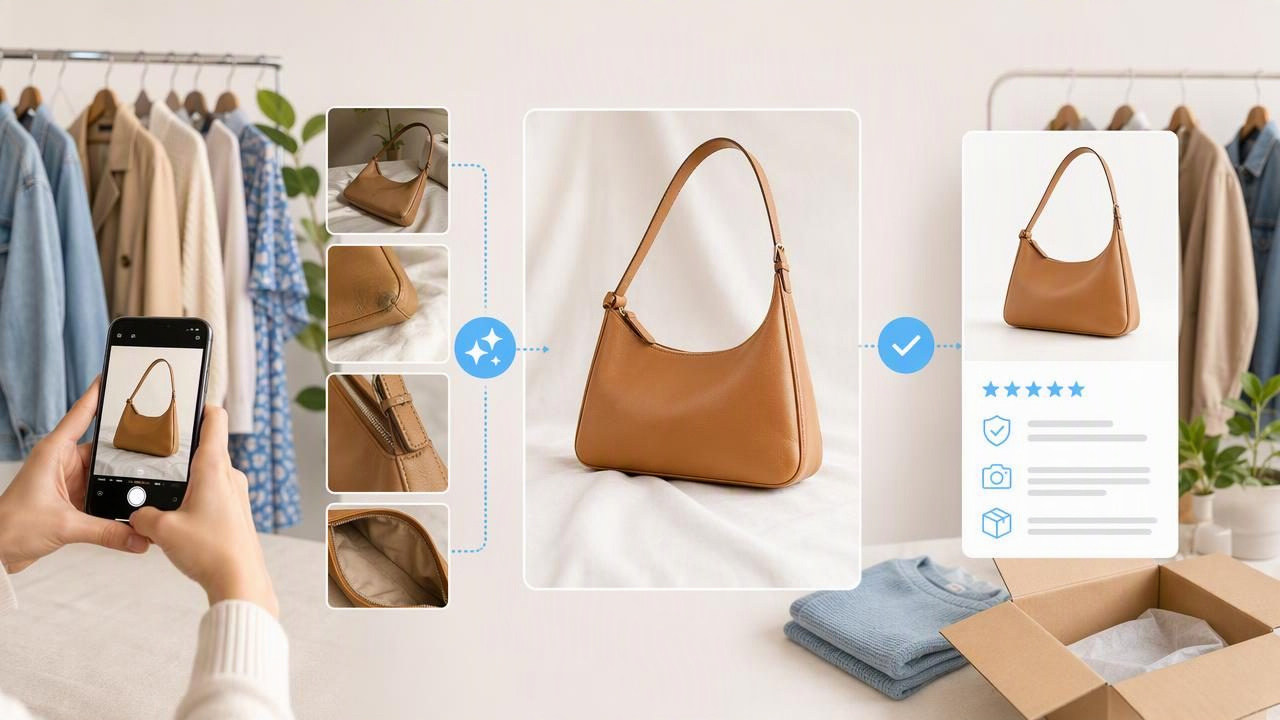
Great fashion resale photos do more than make an item look polished. They help a buyer understand what they are considering: the garment’s color, silhouette, condition, fabric texture, and important details. An AI tool for fashion resale photos can speed up editing tasks such as background removal, wrinkle retouching, and consistent presentation, but the best results still begin with an honest original photo.
For sellers managing a closet cleanout, a vintage store, or a growing online resale business, AI editing can reduce repetitive work without turning every listing into a generic catalog image. The goal is not to create a version of the item that does not exist. The goal is to make the real garment easier to see.
This guide explains a practical workflow for using AI in e-commerce clothing photography, including a concrete listing example, presentation choices, quality checks, and limitations to keep in mind before publishing.
Why clothing presentation matters in fashion resale
Online buyers cannot touch the fabric, inspect seams, or try on the garment. Your photos must answer many of those questions visually. A clean image can communicate the basic shape of a blazer, show whether a knit has a loose or dense weave, and help the buyer notice the placement of a print or logo.
Strong clothing presentation also makes a store feel more consistent. When listings use similar crops, backgrounds, and image proportions, buyers can browse more quickly. This is especially useful on marketplaces where shoppers compare many nearly identical items in seconds.
However, consistency should not come at the cost of accuracy. A background can be simplified, and minor capture wrinkles can be reduced, but visible wear, discoloration, pilling, missing buttons, alterations, and damage should remain visible in at least some listing photos. Clear condition images are part of buyer trust.
What an AI tool for fashion resale photos can help with
AI photo editing is most useful when it handles visual cleanup that would otherwise take time across dozens of listings. Common uses include:
- Background removal: Separating the garment from a busy room, wall, rack, or floor.
- Wrinkle retouching: Reducing distracting storage or shooting creases that hide the garment’s overall shape.
- Ghost mannequin presentation: Creating a hollow apparel display that shows structure without showing the person or mannequin.
- Layout consistency: Preparing on-hanger, flatlay, or folded images with a more uniform visual style.
- Image cleanup: Improving the listing’s focus by removing visual distractions around the item.
These tasks are valuable because they support the product rather than replace it. A buyer should still be able to recognize the exact item when it arrives. Think of editing as tidying the viewing environment, not changing the merchandise.
Start with the right source photo
Even the best editing workflow cannot reliably solve a poorly lit, blurry, or heavily obstructed source image. Before choosing an AI feature, take a few minutes to set up the garment properly.
- Use bright, even light so the color and fabric are readable.
- Place the garment against a background that contrasts with its edges.
- Check that sleeves, collars, hems, and straps are not folded underneath the item.
- Smooth the garment physically where possible before photographing it.
- Take both an overall view and close-ups of labels, fabric, hardware, and flaws.
Physical preparation remains important. If a shirt is twisted on its hanger or a jacket is buttoned incorrectly, editing may make the image look cleaner while preserving an inaccurate shape. Correct the garment first, then use AI to refine the photo.
A concrete example: listing a pre-owned linen blazer
Imagine you are listing a beige linen blazer on a resale marketplace. It has been stored folded, so the body has several light creases. You photograph it on a hanger against a plain wall, then take close-ups of the size label, sleeve lining, buttons, and a small spot of wear near one cuff.
In this case, an AI tool for fashion resale photos can help remove the wall background and reduce the distracting fold creases in the main image. The improved photo may make the lapels, pocket placement, and tailored shape easier to view. But the small cuff wear should not be erased. Include the close-up of that area in the listing carousel and mention it clearly in the condition description.
The difference between helpful editing and misleading editing is simple: the main image can look organized and professional, while the additional images still document the garment honestly. A buyer gets an appealing first impression and enough information to make an informed decision.
| Photo element | Helpful edit | What to preserve or disclose |
|---|---|---|
| Background | Remove a distracting room or uneven wall | Keep garment edges accurate |
| Storage wrinkles | Reduce minor creases that distract from the silhouette | Do not imply a different fabric condition |
| Color | Use balanced lighting and realistic correction | Check against the original garment in daylight |
| Wear and flaws | Crop and focus images clearly | Show stains, snags, fading, and repairs |
| Fit and shape | Use a clear hanger, flatlay, or ghost mannequin view | Do not claim exact fit from an edited image |
Choose the presentation style that fits the garment
Not every item needs the same image format. The right choice depends on what the buyer needs to understand first.
On-hanger photos
Hanger images work well for lightweight dresses, blouses, shirts, and outerwear. They are fast to shoot and can show the length and drape of an item. Make sure the hanger does not stretch the neckline or distort shoulder seams.
Flatlay photos
Flatlays are useful for T-shirts, jeans, sweaters, scarves, and casual pieces. They make it easy to show measurements, prints, and details. Carefully arrange the sleeves and hems so the silhouette is clear rather than compressed.
Folded photos
Folded layouts suit items where texture, branding, or a front graphic matters more than the full shape. They can be effective for sweatshirts, knitwear, and packaged items, but include an unfolded view when the buyer needs to assess length or construction.
Ghost mannequin images
Ghost mannequin presentation can be particularly useful for structured garments such as jackets, dresses, button-downs, and activewear. It can show the interior neckline and garment shape in a clean catalog-style format. Still, it cannot guarantee exact body fit, simulate how every fabric drapes on a person, or reveal hidden construction issues. Use measurement details and additional photos alongside it.
A fast, repeatable resale photo workflow
A reliable workflow prevents rushed edits and helps you publish listings with fewer mistakes. Try this sequence for each garment:
- Inspect: Note brand, size, material, measurements, and every visible condition concern before shooting.
- Prepare: Lint-roll, steam when appropriate, fasten buttons or zippers, and arrange the item naturally.
- Photograph: Capture a front view, back view, labels, details, and flaws before editing anything.
- Edit the hero image: Use background removal or light wrinkle cleanup to make the first image easier to scan.
- Compare with the original: Look closely at edges, seams, logos, color, texture, and details after processing.
- Add proof photos: Keep original or lightly edited images for labels, measurements, and condition concerns.
- Write accurately: Match the title and description to what is actually shown in the photos.
This workflow makes editing more useful because it is connected to inspection. If you notice a flaw before photography, you are less likely to accidentally hide it during cleanup.
Quality checks before you publish
Before uploading, review the edited image next to the original. This simple comparison helps catch common problems such as an uneven hem edge, a missing strap, an altered logo, or an unnatural-looking fabric area.
- Are the garment edges clean and complete?
- Does the color still resemble the item under neutral light?
- Are buttons, pockets, prints, and labels unchanged?
- Does the item’s texture still look believable?
- Have all visible flaws been photographed and described?
- Does the lead image make the garment easy to understand at thumbnail size?
If an edit creates uncertainty, use the original photo or make a lighter adjustment. A slightly imperfect but truthful image is better for a resale business than a polished image that creates an avoidable return.
Important limitations of AI clothing photo editing
AI editing can improve presentation, but it cannot verify the garment’s condition, authenticate a brand, identify an exact fabric composition, or determine accurate measurements. It also should not be relied on to repair hidden defects or make a worn item appear new.
Texture deserves special attention. Fine knits, linen, lace, ribbing, embroidery, sequins, and distressed denim may need closer review after wrinkle editing or background removal. Processing can sometimes simplify subtle visual information. When texture or condition is a major selling point, include a close, well-lit original photo as supporting evidence.
Likewise, a polished ghost mannequin image can clarify shape, but it is not a substitute for measurements or fit notes. State pit-to-pit, waist, inseam, length, and other relevant measurements when possible. Buyers can then combine the visual presentation with practical sizing information.
Use AI to support trust, not replace it
The most effective fashion resale listings balance attractive e-commerce photography with transparent documentation. Use AI to remove distractions, standardize your catalog, and make the garment easier to inspect. Then support that polished lead image with accurate close-ups, measurements, and clear condition notes.
For sellers exploring wrinkle cleanup and hollow apparel displays, Clothing Studio’s guide to ghost mannequin photos offers additional context; full app features require a subscription. Whatever tool you choose, compare the result with the original garment photo before listing so your presentation remains useful, accurate, and buyer-friendly.
