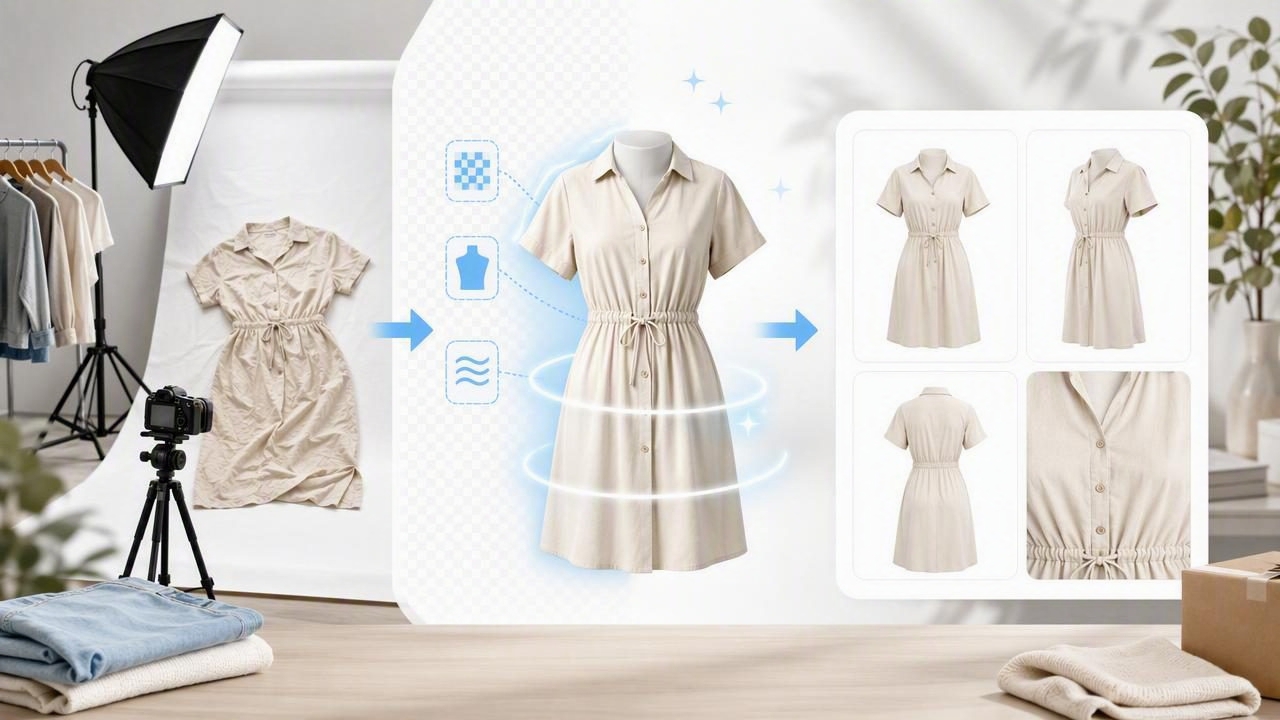
If you sell clothing online, you already know the photo problem: a full photoshoot takes time, space, equipment, and often money you’d rather put into inventory. Yet buyers still expect clean, consistent images—especially on marketplaces where shoppers scroll fast and compare dozens of listings at once.
The good news is that you don’t need a studio setup to get “shop-ready” photos. A photoshoot alternative for small fashion sellers is to combine a simple capture routine (using a phone) with AI photo editing that standardizes your images—without making them look over-processed. This article breaks down an approachable workflow you can repeat every week, whether you shoot on-hanger, folded, or flat lay.
Why traditional photoshoots break down for small sellers
Traditional product photography is great—but it’s built for teams. Small sellers and lean brands face common friction points:
- Time cost: steaming, styling, lighting, shooting, transferring, editing, and uploading adds up fast.
- Space constraints: not everyone has room for backdrops, light stands, or a mannequin.
- Inconsistency: photos shot at different times of day or in different rooms can look mismatched in your shop grid.
- Editing fatigue: removing backgrounds and fixing wrinkles manually is tedious and easy to postpone.
An AI-assisted workflow doesn’t replace your eye for styling and accuracy—it simply reduces the repetitive steps so you can list faster and more consistently.
What “shop-ready” really means for clothing listings
Before building a workflow, define your target output. For most apparel categories, “shop-ready” photos share a few traits:
- Clean separation between garment and background
- Natural texture (fabric looks real, not smeared)
- Accurate color (especially for neutrals and saturated tones)
- Consistent framing (similar crop, scale, and alignment across listings)
- Low distraction (no clutter, harsh shadows, or busy rooms)
Rule of thumb: your photos should answer “What is it?” in half a second and “What does it look like up close?” in the next two seconds.
The three best presentation styles (and when to use each)
1) On-hanger (fastest for volume)
Great for tops, dresses, outerwear, and items with structure. Hanger shots are quick, but backgrounds and wrinkles can undermine the look—two areas where AI editing helps.
2) Folded (best for knits, denim, tees)
Folded shots reduce styling effort and can look premium if you keep folds intentional. The key is consistent framing and a clean background.
3) Flat lay (best for detail storytelling)
Flat lays shine when you want to emphasize fabric drape, embellishments, or styling context. Keep props minimal so the garment remains the hero.
A simple capture setup (no studio required)
You can dramatically improve raw photos with a few low-effort habits:
- Pick one “photo corner.” Same wall, same floor, same distance from the garment.
- Use soft, even light. Stand near a window with indirect light; avoid overhead yellow bulbs.
- Keep the phone level. A slightly tilted camera makes items look skewed and harder to standardize.
- Leave space around the garment. Give editing tools room to crop and align consistently.
- Shoot a quick detail set. Add close-ups: tag, fabric texture, flaws, and special features.
Pro tip: if you can only do one thing, do this—shoot at the same time of day for similar lighting.
The AI editing workflow (repeatable in under 10 minutes per item)
This is the core “photoshoot alternative for small fashion sellers”: capture quickly, then let AI handle the repetitive cleanup so your listings look consistent.
Step 1: Choose your “hero image” style
Decide what your main image will be across the shop: on-hanger, folded, flat lay, ghost mannequin, or model-style. Consistency matters more than choosing the “perfect” style.
Step 2: Background removal (for clean catalog vibes)
A clean background helps buyers focus on shape, color, and condition. If your platforms allow it, a plain light background is usually the safest choice.
- Watch the edges: fuzzy hems, lace, and shearling can look cut-out if the tool is too aggressive.
- Check negative space: openings (sleeves, collars) should look natural, not filled in.
Step 3: Unwrinkle (without “plastic fabric”)
Wrinkles are a top reason items look low-quality in thumbnails. AI unwrinkling can save time, but the goal is believable fabric:
- Keep normal drape lines (especially on linen and cotton).
- Preserve texture (knits, denim, ribbing).
- Zoom in to verify seams and edges aren’t warped.
Step 4: Ghost mannequin effect (a premium look without a mannequin)
Ghost mannequin images create the illusion of a filled-out garment while keeping the focus on the product. This can be especially helpful for:
- Collared shirts (shape and collar stand)
- Jackets (structure and lapels)
- Dresses (bodice and waist definition)
To keep it natural, make sure the inner neck and label area doesn’t look “melted” or overly smoothed. If the garment has a deep V or wide neck, check that the interior opening is clean and symmetrical.
Step 5: Model-style images (when you need lifestyle without logistics)
Many buyers want to imagine fit and silhouette, but hiring models or shooting yourself can be slow. AI-generated model-style images can be useful for certain categories, especially if you disclose clearly when images are stylized and keep your listing description accurate.
Best practices:
- Prioritize accuracy: never misrepresent color, sleeve length, neckline shape, or branding.
- Use real detail photos too: include at least one unambiguous close-up of fabric and condition.
- Avoid extreme styling: simpler poses and neutral settings keep focus on the garment.
Comparison table: three realistic paths to better photos
| Option | Upfront cost | Time per item | Consistency | Best for |
|---|---|---|---|---|
| DIY photoshoot + manual editing | Low–Medium | High | Medium | Small catalogs, sellers who enjoy editing |
| Freelance photographer / studio | Medium–High | Low (your time), scheduling overhead | High | Large drops, premium brand campaigns |
| Phone photos + AI editing workflow | Low | Low–Medium | High (once standardized) | Resellers, boutiques, frequent listing |
Quality control checklist (so AI edits don’t hurt trust)
AI is fast, but you’re still the final editor. Use this quick checklist before posting:
- Edges: no missing straps, chopped hems, or jagged cutouts.
- Color: compare to the item in hand; adjust if the background cleanup shifted tones.
- Logos & patterns: ensure prints aren’t distorted and branding isn’t altered.
- Texture: denim grain, knit weave, and silk shine should remain visible.
- Shadows: subtle shadows can add realism; harsh fake shadows look uncanny.
How to keep your workflow organized (and faster over time)
Batching: the fastest way to list more
Instead of completing one item end-to-end, batch your work:
- Prep 10–20 items (lint roll, quick steam if needed).
- Shoot all items (hero shot + details).
- Edit all hero shots in one session (background removal, unwrinkle, alignment).
- Export and upload.
A simple file naming pattern (helps when you cross-list)
If you share photos across platforms, consistent names prevent mix-ups:
brand_itemtype_color_size_condition_01.jpg
zara_blazer_black_m_guc_01.jpg
zara_blazer_black_m_guc_02-detail.jpg
This makes it easier to find the right images later, especially if you relist seasonal items.
Common mistakes to avoid
- Over-smoothing: if fabric looks airbrushed, buyers may assume damage is being hidden.
- Inconsistent crops: one oversized close crop next to a tiny distant shot makes your shop look random.
- Skipping detail photos: AI-clean hero images still need real proof shots (tags, seams, flaws).
- Editing the “truth”: remove lint and wrinkles, not stains, holes, or fading that should be disclosed.
Putting it together: a repeatable listing template
Here’s a practical set that balances speed and buyer confidence:
- Photo 1: Clean hero image (background removed, aligned)
- Photo 2: Alternate angle (back view or sleeve/hem focus)
- Photo 3: Close-up of fabric texture
- Photo 4: Tag/label + material/care
- Photo 5: Any flaw clearly shown (if applicable)
- Optional: Ghost mannequin or model-style image for shape context
When shoppers can quickly confirm shape, condition, and material, they hesitate less—which is the real goal of better photography.
Final thoughts
You don’t need a full studio to compete visually. With consistent phone capture, smart background removal, natural-looking unwrinkling, and optional ghost mannequin/model-style enhancements, AI editing can be a reliable photoshoot alternative for small fashion sellers—helping you list faster while keeping your shop cohesive.
If you’re looking for an iOS tool that bundles these steps (background removal, unwrinkling, ghost mannequin, and model-style generation) into a simple workflow, Clothing Studio is one option to explore via its free demo.
